
USB creation
 Rufus
Rufus
Make a Linux USB on Windows with Rufus.
What is Rufus?
Rufus is a small Windows app for making bootable USB sticks. Download it and run it; there’s no installation needed.
Download Rufus (opens in a new tab)
Make the USB
Download your distro’s ISO file from its official website first.
- Choose your USB
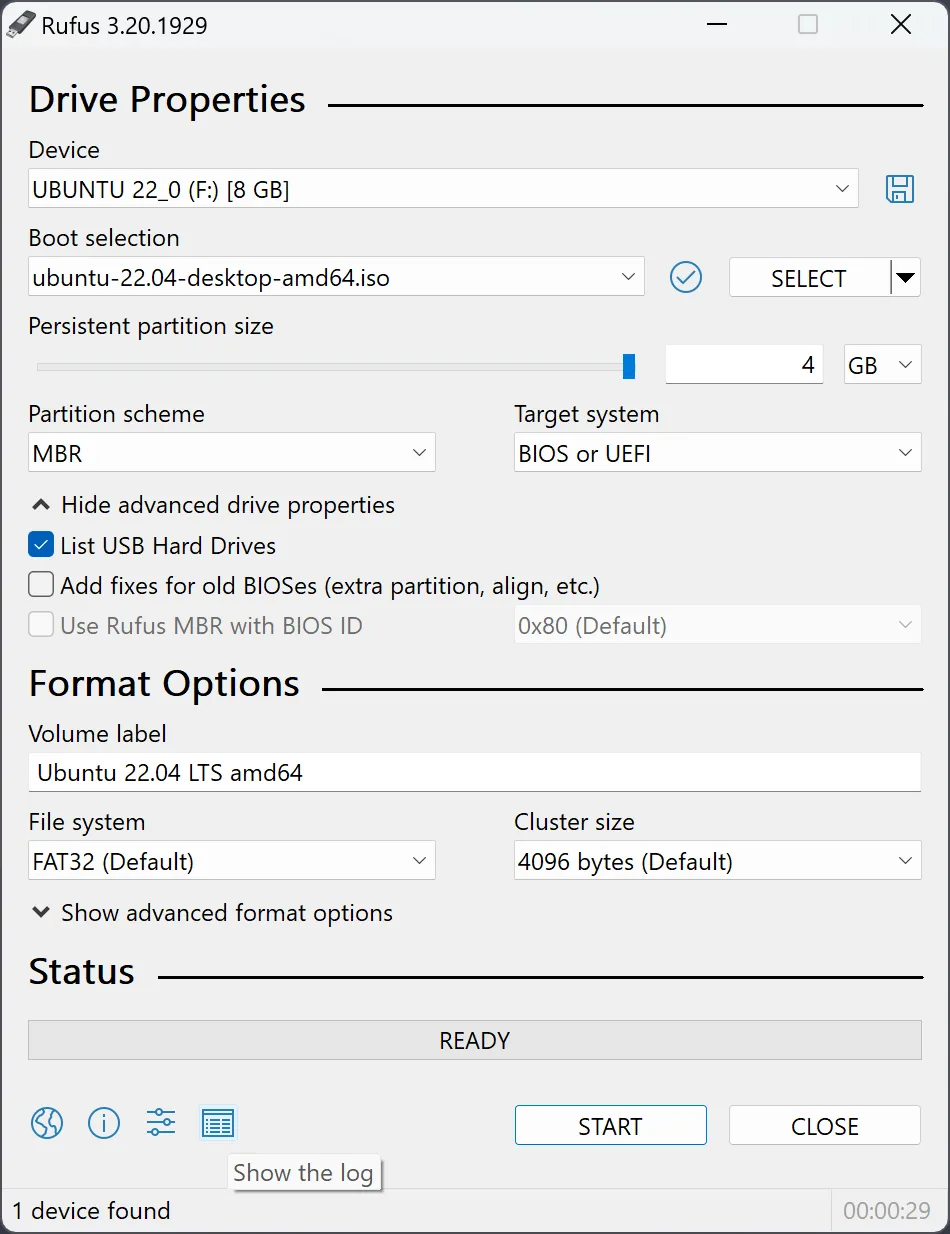
Open Rufus and select your USB stick under Device.
- Choose the download
Click SELECT and choose your Linux ISO file.
- Write the image
Follow your distro's recommended Rufus settings, then click START. Confirm the erase warning only after checking the selected drive. Wait until Rufus says READY.
If Rufus asks about ISO mode or DD mode, follow your distro’s instructions. These are two ways of writing the USB, and the recommended choice can differ.
What next?
Safely eject the USB, then follow Trying Linux to start from it.